When encryption is not enough

There is a saying in cryptocurrency: “not your keys; not your coins.”
In essence, if you don't control the keys to the wallet containing the cryptocurrency—usually a series of random words generated at the time that the wallet is created—then you don't really own the money inside it.
It's the difference between having your money in a bank that actually possesses your cash and lets you access it, or in an impenetrable safe where only you know the combination. If you possess the cash and the safe, you truly own the money.
The same can be said for encryption.
Whether you realize it or not, it's likely that many of your devices enable encryption by default. For example, iPhones are encrypted by default and so are most modern Windows machines.
Sounds good, right?
But it presents the same problem as with crypto: who holds the keys?
When your Windows computer is encrypted, it's using Microsoft's BitLocker. The data can be accessed only once you type in your password or PIN, or authenticate with biometrics. However, Microsoft also ensures that a recovery key is created and backed up to your Microsoft account.
It's a convenient solution and provides an avenue of recovery should you ever forget your password or PIN. But it also means that Microsoft has access to that recovery key at any time.
This was evidenced recently when Microsoft gave the FBI the recovery keys to unlock hard drives belonging to suspects in a fraud case.
Notably, Microsoft complies with these kinds of requests from law enforcement multiple times each year:
Microsoft told Forbes that the company sometimes provides BitLocker recovery keys to authorities, having received an average of 20 such requests per year.
The story isn't much different at Apple, though there are some notable improvements. The company's iCloud services are encrypted by default, but similar to Microsoft, the decryption keys are sent to Apple's servers, giving the company access if needed.
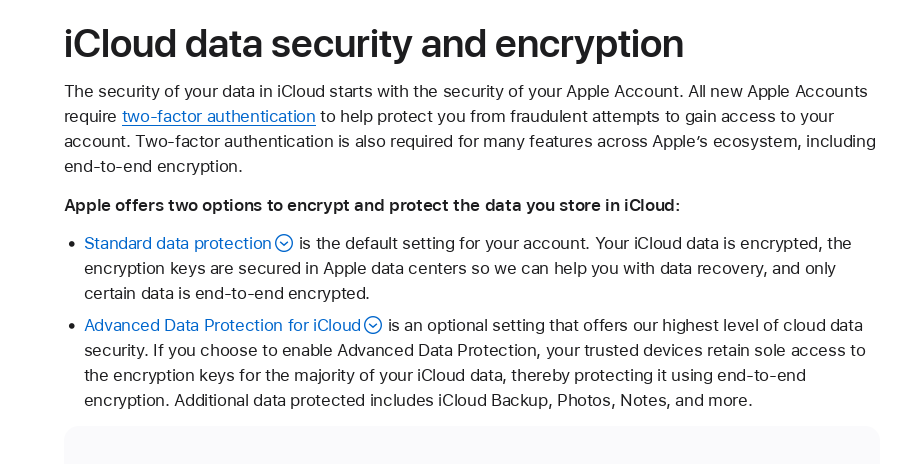
The good news is that Apple has set aside 14 categories that it says it cannot access no matter what, as the keys are only stored on your devices. These categories include your messages, health, passwords, and maps.
Owning your data is a form of digital autonomy
Some might say Microsoft sharing a user's recovery key with law enforcement is not a problem. Generally speaking, the Decent Project agrees.
The Decent Project believes that law enforcement has a job to do and there are laws within which they must operate. When law enforcement has identified a suspect and obtains a lawful warrant to access account information from a company, we do not argue that the company is under an obligation to comply.
Instead, the Decent Project advocates for individuals to minimize their own risks by reducing their attack surface. If Microsoft or Apple do not have access to decryption keys, then there's virtually nothing they can turn over.
To be clear, government officials seeking information via a lawful warrant is the least of our concerns. Instead, we recognize that what is available to the “good guys” is also available to the “bad guys.”
Any decryption key stored by Microsoft or Apple runs the risk of being exploited by rogue employees, hackers, or government officials who are not operating with the bounds of the law.
Are you comfortable them seeing all your photos? Your digital journals? Your notes? Your health records?
The best defense is an offense in which individuals retain control of their data—and most importantly—the keys to it.
Recommendations
Turn on encryption wherever possible
Whether it's your computer or phone, if there are options to encrypt your device your should always do so.
Encrypting your device ensures better security and privacy, but does comes with additionally responsibility.
When encrypting your devices, you should look for options that allow you to control the recovery/decryption keys. With BitLocker, for example, this means declining any options to store the recovery key in your Microsoft account.
Keys should be securely stored and this can be done by using a reputable password manager—another basic privacy and security tool discussed below.
Turn on Apple's Advanced Data Protection
For Apple users, it is a simple procedure that can be done by following this guide.
There are two ways you can ensure recovery, one is by designating a trusted contact who would be able to use their Apple device to unlock your account, or by storing the recovery key yourself.
You'll have to decide which method is best for you, but again, storing your own recovery key is the safest method—just be sure to store it in a manner that ensures it will not get lost, stolen, or compromised.
Use a password manager
It is 2026. If you are not yet, it is time to start using a password manager.
There are a number of free or nearly free options out there that will greatly enhance your privacy and security.
Password managers almost always include password generators to ensure unique and strong passwords for each account. Your credentials can be autofilled so you virtually never have to type in your passwords or copy/paste.
A reputable password manager is an essential tool in an idividual's privacy and security toolkit. Please check out our Resources page where you can find recommendations. (As of the time of this writing, we are still working to put this together but it should be there for those reading this the future).
Many providers also allow you to securely store more than just passwords. You can store passphrases, decryption keys, or files. This makes it extremely easy to take advantage of encryption while not relying on providers like Microsoft and Apple to store your decryption keys.
~ Torman
Verify this post: Source | Signature | PGP Key
#privacy #security #bigtech #encryption
If you enjoyed reading this or found it informative, please consider subscribing in order to recieve posts directly to your inbox:
Also feel free to leave a comment here: Discuss...